Creating an account is the good thing for people who want to try Maan Win and see what it has to offer. The sign-up process usually starts by going to the registration page putting in the needed details and making a way to log in. Depending on the place where you are signing up you might also have to check that your account is real.
Knowing how the sign-up works can make it easier for new people to use the platform. This guide talks about how to make an account what information you may need, how to fix problems that come up and what you can do once you have an account.
How to Make an Account Step by Step?
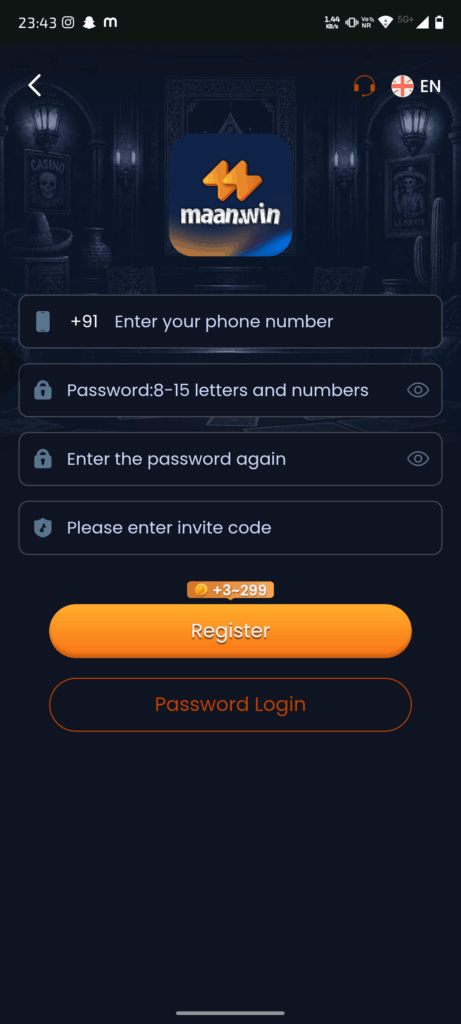
Here are the general steps that you can simply follow to make an account since the Maan Win offers a straightforward registration process using registration page:
Step 1: Open the Sign-Up Page
Go to the Maan Win website that’s real and find the registration option. Click on it to go to the account creation page.
Step 2: Fill in the Information
Now you have to add all the details that are required by the platfrom for example your mobile number or email address and username.
Step 3: Make a Password
If the system asks for a password make one that’s special and not easy to guess. Don’t use the password for other accounts.
Step 4: Check Your Details
Some registration systems use a code or another way to make sure it’s you. If you are asked follow the steps that the platform gives you.
Step 5: Finish Signing Up
Look over the information you put in. Send the form. If it works follow the steps that show up on the screen.
Step 6: Use Your Account
Go to the login page and type in your details if needed. Once you are in look around the account menu. Get to know the choices.
What to Get Ready Before Signing Up
Having the right information can make signing up. The things you need depend on the form that the platform gives you.
Common things you might need include:
Device: A device that works is a phone, tablet or computer that can open the registration page.
Internet connection: An internet connection that is strong is needed to finish the form.
Phone number: A phone number may be needed for making an account or checking it.
Password: A password is required if the platform uses passwords to log in.
Verification info: Verification info such, as a code or other details is asked during checking.
Basic personal info: Basic personal info may be needed according to the platforms rules.
Form: Not every form asks for all of these. Enter what the real sign‑up process asks for.
Registration Criteria
Who can create an account depends on the platform rules and the rules in your area. Before you try to sign up check the age. Make sure the service is available to you.
People may need to give information and finish checks when needed. Some games or parts of an account may have rules. Sign‑up rules can also change when the platform updates its policies. Looking at the rules helps people know what they can do after making an account.
What You Can Do After Making an Account
Once you are signed up you can use account features depending on what the platform has.
Try the games: Look through the categories. Read the instructions for each game.
Change your account settings: Check your profile. Update the details that you can.
Use login options: Go back to the platform using your account details.
Check your activity: If there is a history use it to see what has happened and any money changes.
Find help on the platform: Look through help pages, updates and instructions given by the platform.
Common Problems When Signing Up
Sometimes people have issues when making an account. A few simple checks can help find the problem.
The registration page doesn’t open: Check your internet. Reload the real website.
An error message says information is wrong: Look at the fields. Fix any mistakes.
The code does not come: Make sure the contact info is right and follow the steps to get another one.
The form doesn’t send: Check if any fields are missing. Try again when the connection is good.
The login doesn’t work after signing up: Make sure the details are right and check if there is a step needed.
Explore common login issues on this page: Maan Win Login
Frequently Asked Questions
Q1. Can I make a Maan Win account whenever I want?
It depends on if the service’s working and taking new people. Check the sign-up page for details.
Q2. Do I have to choose a name while registering?
Yes you can choose a username for your account to easily login using username.
Q3. What happens after I send the form?
The platform might show a message. Ask you to check your account before you can use it.
Q4. Can I change my details later in my account?
yes you can log in to your account and edit details in the account dashboard sections.
Q5. Where can I get help with signing up?
Look for a help section or real support on the platform. Follow the steps for account help.
Conclusion
Making a Maan Win account usually starts with going to the sign-up page and putting in the details. Then you check if it is real and use the login page. Getting ready before can make the process easier.
By learning the steps the rules for being eligible and the things you can do new people can get comfortable with the platform. I feel more confident about using it. Make sure to look at the sign-up page to read the rules and the steps.